
SearchWP Plugin Review: Why WordPress Search Breaks at Scale—and How SearchWP Fixes It
For a long time, I treated WordPress search as something that technically existed but didn’t deserve much attention. It worked… sort of. Until it didn’t.
As ConcealedCarry.com grew into a large, content-heavy site, search quietly became one of the weakest parts of the user experience. After finally investing the time to fix it, I realized the real issue wasn’t configuration—it was WordPress’s entire approach to search.
This is a high-level, strategic SearchWP plugin review, based on my experience implementing SearchWP on a site that is both content-dense and eCommerce-driven.
Table of Contents
The Core Problem: WordPress Search Treats All Content as Equal
Out of the box, WordPress search does something that sounds reasonable but quickly becomes disastrous at scale:
It searches everything.
On small sites, that’s fine. On large sites, it’s chaos.
When You Have 20+ Post Types, This Completely Falls Apart
On my biggest WordPress site, I have more than 20 post types.
Some are:
- Editorial content users should find
- Structured reference material
- Evergreen resources
Others are:
- Administrative post types
- Internal tools
- System-generated objects
- Backend-only data structures
- Landing pages from dated and old campaigns and sales
None of those belong in public-facing search results. And yet default WordPress search includes them unless you start hacking together custom solutions.
The Single Most Valuable Feature: Controlling What Appears in Search
Before relevance weighting, before analytics, before templates—the most important feature for me was simple:
SearchWP lets you explicitly choose which post types are searchable.
This alone changes search from:
“Hope WordPress figures it out”
to:
“Only show content that actually makes sense for users.”
On a complex site, excluding entire post types from search results isn’t a nice-to-have. It’s foundational.
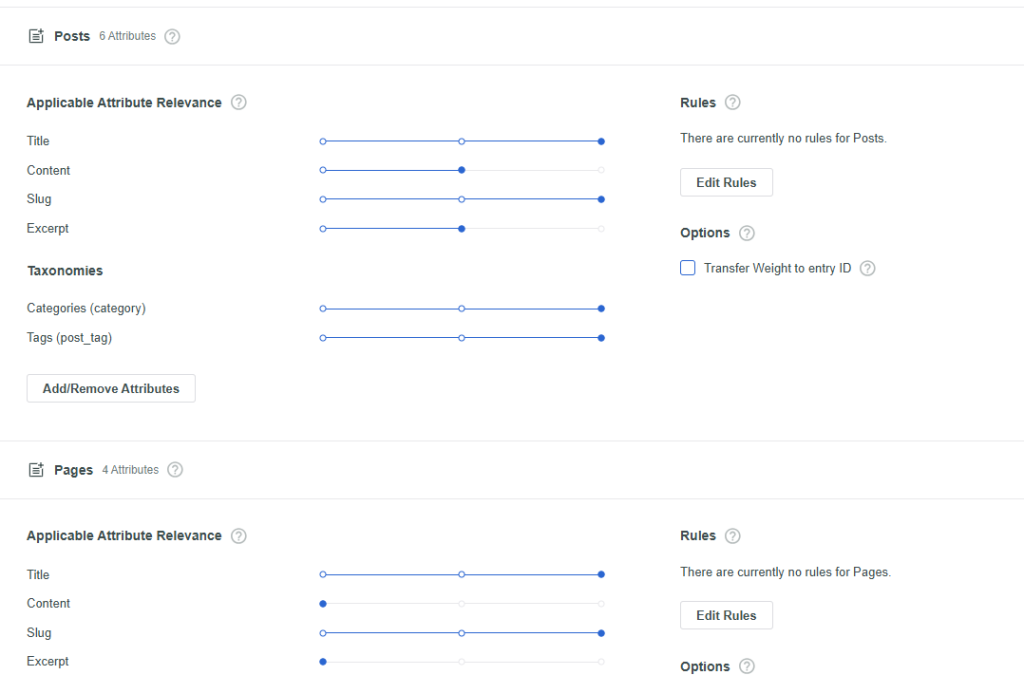
For each post type you can determine how heavily the title, content, slug, and excerpt, custom fields, or taxonomies are weighted in determining the order of search results.
Additionally, for any give page, post, or other post type, the admin has a new option to just check a box to exclude the content from search. So easy.
Search Analytics: Seeing What Users Expect to Find
Another major gap in WordPress is internal search analytics.
By default, WordPress gives you no clear answers to:
- What are people searching for?
- How often are they searching?
- Which searches return poor or irrelevant results?
You can piece some of this together through Google Analytics, but it’s indirect and frustrating. SearchWP fixes this by showing you the actual on-site search terms and how often they’re being used.
That data matters more than most site owners realize. It tells you what users think your site contains—and where your navigation, labeling, or content library isn’t doing its job.
The “Ug” Moment: When the Right Result Isn’t Anywhere Near the Top
Here’s the moment that really sold me on SearchWP’s relevance controls.
While reviewing search analytics, I noticed someone had searched for one of our products by name: Complete Home Defense.
That’s exciting—until I tried the search myself.
The product they were clearly looking for wasn’t even on the first page of results.
Why? Because ConcealedCarry.com is a content-heavy site that also sells products. We have dozens of articles that focus on home defense, reference it, or mention it incidentally. Default WordPress search doesn’t understand intent—it just matches words.
Pushing the Right Result to the Top
SearchWP gives you the ability to intentionally promote specific content for specific searches.

In addition to pushing the product to the top of the result I also have a setting turned on to highlight the search phrase in the search results which I really like.
In my case, that means:
- When someone searches for home defense
- Or searches for Complete Home Defense
- The product can be explicitly pushed to the top of the results
This turns search from a passive system into an active UX tool.
Instead of:
“Here’s a pile of related content.”
You get:
“Here’s what you’re probably looking for.”
For any site that blends education and commerce, this is a huge win.
Search Results Pages: “Sorta Works” Isn’t Good Enough
WordPress’s default search results page technically functions—but just barely. It looks generic, offers little control, and doesn’t scale well with complex content.
On ConcealedCarry.com, I used Beaver Themer to create a search results layout that actually matched the site design and content structure. That solved the presentation problem—but not the logic problem.
SearchWP Templates: Treating Search Like a First-Class Feature
SearchWP also has the concept of templates that allow you to display search results in different ways.
Strategically, this matters because:
- Not all searches should look the same
- Not all content should be presented equally
- Search can become part of navigation, not just a utility
Even if you already have a custom search results page, SearchWP’s template system gives you room to grow without piling on theme hacks.
A Feature I’d Love to See Added
No tool is perfect, and there’s one capability I’d love to see SearchWP add:
Global Post-Type Priority.
On my site, it would make perfect sense if:
- Products always appeared first
- Followed by articles, guides, and other content
Right now, SearchWP lets you promote specific content for specific searches (which is incredibly powerful), but there’s no way to globally enforce “always put this post type above all others.”
To be fair, default WordPress search doesn’t offer this either. Still—if any SearchWP developers are reading this: please put this on the roadmap. For hybrid content + eCommerce sites, it would be a game-changer.
Final Takeaway
Search isn’t cosmetic. It’s infrastructure.
Once your WordPress site grows beyond a handful of posts and pages, default search becomes a quiet liability. SearchWP doesn’t just improve search—it gives you control, visibility, and intent where WordPress provides none.
For WordPress site owners who care about user experience—especially on large, complex sites—SearchWP is absolutely worth serious consideration.
It isn't a free plugin if you want it to work well. Learn more here.
Resource: See all of my favorite WordPress Plugins